Auto-Sizing Settings
THRUX will calculate equipment sizes automatically, but certain parameters can be excluded in the Auto-Sizing settings.
For example, if the designer would like a conduit size to remain constant or intentionally oversized to account for shaft space, deselect Conduit Size shown below.
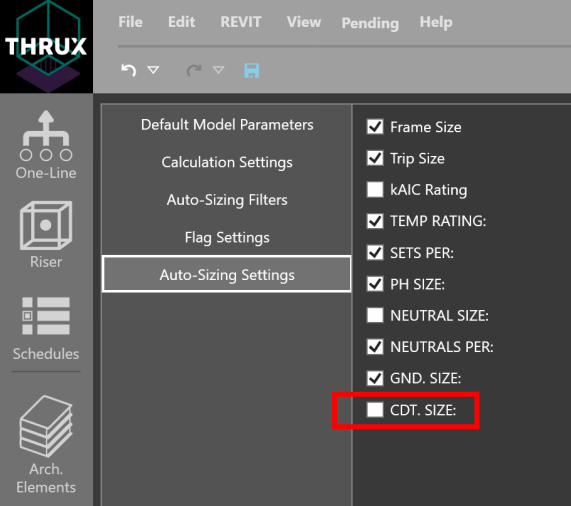
Frame Size
Deselect Frame Size to omit the Frame Size from being recalculated upon changes to circuit properties.
Trip Size
Deselect Trip Size to omit the Trip Size from being recalculated upon changes to circuit properties.
kAIC Rating
Deselect kAIC Rating to omit the kAIC Rating from being recalculated upon changes to circuit properties.
Temperature Rating
Deselect Temperature Rating to omit the Temperature Rating from being recalculated upon changes to circuit properties.
Sets Per
Deselect Sets Per to omit the Sets Per or quantity of sets of conductors from being recalculated upon changes to circuit properties.
Phase Size
Deselect Phase Size to omit the Phase Size from being recalculated upon changes to circuit properties.
Neutral Size
Deselect Neutral Size to omit the Neutral Size from being recalculated upon changes to circuit properties.
Neutrals Per
Deselect Neutrals Per to omit the Neutrals Per from being recalculated upon changes to circuit properties.
Ground Size
Deselect Ground Size to omit the Ground Size from being recalculated upon changes to circuit properties.
Conduit Size
Deselect Conduit Size to omit the Conduit Size from being recalculated upon changes to circuit properties.